


Nocpix LUMI L35 | Lightweight & Compact w/ 32 GB of Storage & 1750 Yards of Detection
Nocpix LUMI L35: Versatile Image Hue and Connectivity Adjustment Device
- The Nocpix LUMI L35 is a compact and advanced imaging device designed to deliver superior performance in diverse lighting conditions.
- Equipped with customizable image hue modes, it allows users to switch between warm and cool settings effortlessly for optimal viewing comfort.
- Features intuitive controls, including long and short press options for seamless navigation and adjustment.
- Offers enhanced connectivity with integrated Wi-Fi to keep you connected and in control at all times.
- Built with durability and reliability, ensuring it performs exceptionally well even in challenging environments.
- Designed with user convenience in mind, it includes a streamlined menu system for easy access to all key functions.

Nocpix LUMI L35 Features & Specifications
The Nocpix LUMI L35 is a compact and versatile device that offers users a blend of functionality and convenience. Designed with an intuitive interface, it provides easy navigation through its features and modes. With options to toggle image hues, manage Wi-Fi connectivity, and simplify operations through buttons, the device ensures a user-friendly experience.
Key Features
- Wi-Fi Connectivity: Easily toggle Wi-Fi on or off via the status bar.
- Image Hue Modes: Switch between warm and cool image hues through a straightforward menu navigation system.
- User-Friendly Controls: Utilize long and short presses of the Menu, Up, and Down buttons for efficient operation.
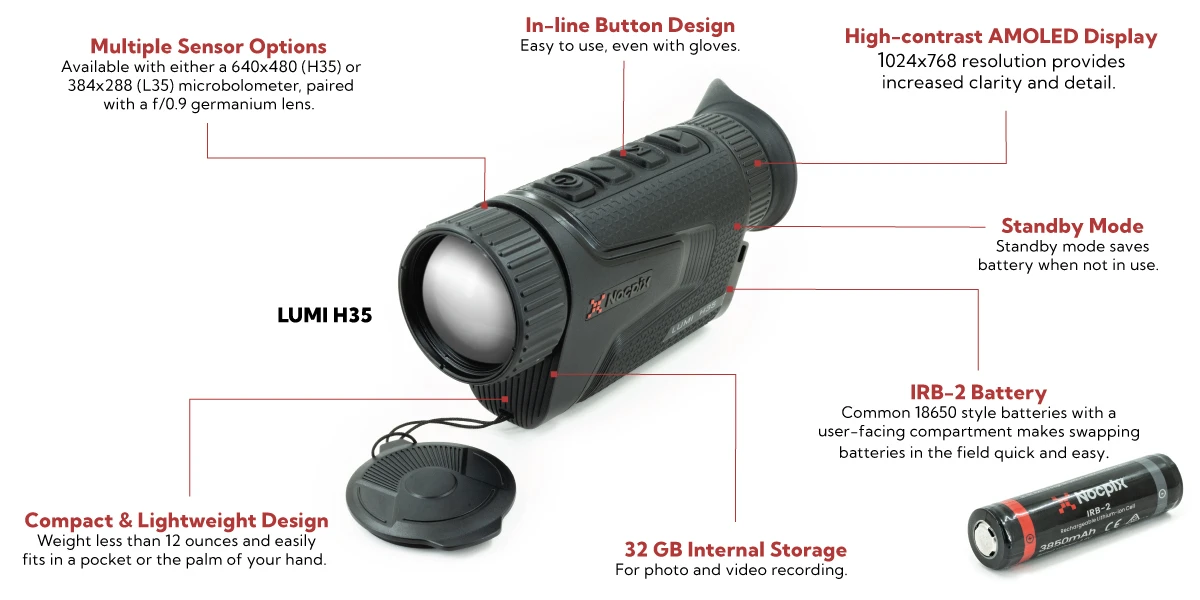
- Compact Design: Portable and lightweight, ideal for various use cases.
- Simplified Navigation: Long and short button presses for seamless transitions between menus and features.

What's in the box of the Nocpix LUMI L35?
- (1) Nocpix LUMI L35 thermal device
- (1) USB charging cable
- (1) User manual
- (1) Protective carrying case
- (1) Cleaning cloth
Nocpix LUMI L35 FAQs
How do I connect the Nocpix LUMI L35 to Wi-Fi?
To connect to Wi-Fi, long press the Menu Button to go to the main menu. Then, use the Up or Down Button to select the Wi-Fi menu item. Once selected, press the Menu Button to toggle the Wi-Fi status on or off. The Wi-Fi status will appear in the status bar.
How can I switch between warm and cool image hue modes?
To toggle the image hue modes, long press the Menu Button to enter the main menu. Use the Up or Down Button to find the image hue menu item. Short press the Menu Button to switch between warm mode (toggle is on) and cool mode (toggle is off).
How do I return to the home screen from any menu?
Simply long press the Menu Button, and the device will return to the home screen.
Is there a way to adjust brightness on the Nocpix LUMI L35?
Yes, brightness can be adjusted directly through the settings menu. Long press the Menu Button to enter the main menu, and then use the Up or Down Button to select the brightness settings. Adjust as needed.